
Last updated: November 17, 2026
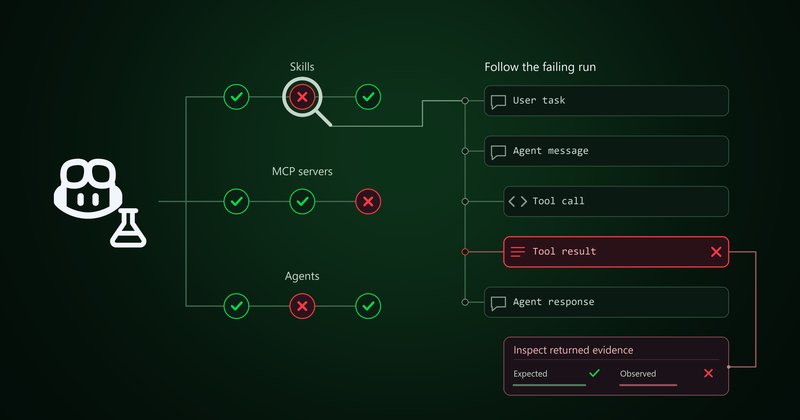
GitHub Copilot Evals is a public preview tool, released November 17, 2026, that turns a task into a repeatable test for your Copilot skills, custom agents and MCP tools. You create an eval, approve each run, see which checks failed and compare runs after a change. It works in VS Code, Copilot CLI and the GitHub Copilot app.
Contents
- What GitHub released
- What is in the plugin
- How to install it
- How to create and run your first eval
- Runs, costs and saved results
- Copilot Evals compared with running Vally directly
- Limitations and privacy
- Frequently asked questions
What GitHub released
GitHub announced in its changelog on November 17, 2026 that GitHub Copilot Evals is now in public preview for Copilot Individual, Copilot Business and Copilot Enterprise plans. GitHub defines an eval as a repeatable test: a realistic task, a description of a good result, and checks on both the result and how the agent got there.
The point is regression testing. AI output changes between runs, so one good answer does not prove a customization works. After editing a skill, agent or MCP tool, rerun the same eval and compare.
If you already build custom workflows, this pairs naturally with Copilot Automations and the plugin system covered in our Copilot CLI 1.0.111 guide.
What is in the plugin
The github/evals repository README lists these components:
| Component | What it does |
|---|---|
| Six skills | create, review, improve, run, compare and setup, callable in plain language |
/eval commands |
/eval setup, /eval create, /eval review, /eval improve, /eval run, /eval compare in Copilot CLI and the Copilot app |
| Evals Canvas | Side panel to browse project assets, draft evals, inspect YAML and read saved run reports |
| MCP server | A 15-tool copilot-evals server bundled with the plugin |
| Automation blueprints | Three .automation.md definitions: eval-health-review, eval-smoke-run and eval-skill-compare |
What you can test, according to the extension documentation: skills defined in SKILL.md, custom agents defined in *.agent.md files, and MCP tools.
How to install it
The Copilot Evals getting-started guide recommends Node.js 24 or later, Vally 0.19.0 or later, Copilot CLI 1.0.85 or later and Git 2.28.0 or later. The README notes the VS Code extension needs only Node.js 22.14.0. Install steps differ by surface:
| Where you use Copilot | How to install | Notes |
|---|---|---|
| VS Code | Install GitHub.copilot-evals (publisher GitHub) from the Visual Studio Marketplace |
VS Code 1.138.0 or later, local trusted project; run “GitHub Copilot Evals: Open Evals Canvas” |
| VS Code Agents window | Install the extension in the default profile, enable chat.canvases.enabled |
Do not also enable the standalone plugin in the same session |
| Copilot CLI | copilot plugin marketplace add github/evals, then copilot plugin install eval@github-copilot-evals |
/eval commands and Canvas need experimental mode |
| GitHub Copilot app | Customize > Browse > Add > Manage marketplaces, enter github/evals, install eval |
Start a fresh session, then /eval help |
In the CLI, the six skills work without experimental mode. To get the native /eval commands and the Canvas, the guide says to turn on CLI-wide experimental mode with /experimental and start a fresh conversation. For the app itself, see our GitHub Copilot app guide.
How to create and run your first eval
The README walks through this sequence:
- Open a local project in Copilot CLI or VS Code, trust the folder and sign in to GitHub Copilot.
- Enter
/eval create, or open the Evals Canvas, and pick a skill, custom agent or MCP tool to test. You can also just ask, “Help me create evals for my skills.” - Describe what a passing result looks like. For a release-notes skill, GitHub’s example checks that only completed work appears and input files stay unchanged.
- Review the proposed test cases, fixtures and checks, then save the eval.
- Run
/eval runor choose Review & run in the Canvas. Review the execution effects and token or credit costs, then approve the run. - Inspect the report with
/eval reviewor the Results tab to see passing checks, outputs and the conversation trace. - After editing your skill or agent, run the eval again and use
/eval compareagainst the previous saved result.
Running needs the local eval runner. In the Canvas, go to Settings > Advanced > Install eval runner, or run “GitHub Copilot Evals: Set up test runner” in VS Code. Use /eval setup to configure eval folders and test suites. The compare skill can also run one task with and without a skill.
Runs, costs and saved results
- Saving and running are separate. File validation and reading or comparing saved results make no model calls.
- Every run needs approval. Each eval run or grader test shows its execution effects and token or credit costs first. Opening or installing Evals never approves a run.
- No spending cap. The getting-started guide says Evals does not enforce a total token or credit cap, so watch large suites and repeated trials.
- Local execution. Setup scripts, tools, graders and AI judges run under your normal local permissions.
- Results stay in your project. Reports are written to
.copilot\evals\results. Review them before sharing.
For how Copilot picks and bills models, see our Copilot Fusion guide.
Copilot Evals compared with running Vally directly
GitHub says Copilot Evals uses Vally, Microsoft’s extensible local eval tool, as its engine. Its pipeline is stimulus, executor, trajectory (every turn, tool call and token), graders and score.
| Question | GitHub Copilot Evals | Vally on its own |
|---|---|---|
| Main user | Copilot users testing their skills, agents and MCP tools | Teams evaluating any AI project |
| How you author evals | Ask Copilot or use /eval create and the Canvas |
Configure executors and graders yourself |
| What it can run | Copilot skills, custom agents, local Node.js stdio MCP servers | Any MCP server, skillset or CLI agent with an executor, or your own |
| Where it runs | VS Code, Copilot CLI, Copilot app | Your dev workflow, CI or an isolated environment |
Copilot Evals is the guided front end; Vally is the general engine. Teams testing agents through an SDK, as in our Cursor Agent SDK guide, may prefer Vally directly for CI.
Limitations and privacy
- MCP scope. One local Node.js stdio MCP server per run. Python and remote MCP servers are not currently supported.
- VS Code scope. Bundled skills are unavailable in remote, web and untrusted workspaces.
- A pass is not a guarantee. GitHub says a passing check does not mean the AI will get it right every time.
- Telemetry. Plugin telemetry is on by default but excludes code, prompts and outputs. Set
COPILOT_EVALS_TELEMETRY=offto disable it. - License. The code is source available under the GitHub Limited Use Source License, not open source.
Frequently asked questions
What is GitHub Copilot Evals?
GitHub Copilot Evals is a preview plugin and VS Code extension that lets you create, run and compare repeatable tests for your Copilot skills, custom agents and MCP tools. GitHub released it in public preview on November 17, 2026, and it uses Microsoft’s Vally eval engine.
Which Copilot plans can use Copilot Evals?
GitHub says Copilot Evals is in public preview for Copilot Individual, Copilot Business and Copilot Enterprise plans. Features in preview can change before general availability.
Does running an eval cost Copilot credits?
It can. The getting-started guide says chat and eval runs may use credits, and each run asks you to approve its costs, tools and execution effects. Evals does not enforce a total token or credit cap. Saving, validating and comparing saved results make no model calls.
How do I install Copilot Evals in Copilot CLI?
Run copilot plugin marketplace add github/evals, then copilot plugin install eval@github-copilot-evals, and start a fresh conversation in your project. The skills work right away; the /eval commands and Evals Canvas need CLI experimental mode.
Can Copilot Evals test any MCP server?
No. The extension page says it can evaluate one local Node.js stdio MCP server per run, with one task per fresh server start. Python MCP servers and remote MCP servers are not currently supported.
Sources
- GitHub Changelog: GitHub Copilot Evals is now in public preview (November 17, 2026)
- GitHub: github/evals repository README
- GitHub Copilot Evals: Get started
- Microsoft: Vally eval platform
Image: GitHub Copilot Evals illustration from the GitHub Changelog, used for editorial purposes.
Related guide: MAI Code 2 guide to Flash, Copilot pricing and access.