
Last updated: November 22, 2026
DreamCoder is a new AI coding harness released for general use on November 20, 2026. It runs agents, sub-agents, terminals and MCP tools in a tiling window manager that you open in any browser, including on a phone. It is free for personal use and for teams of up to five, then $20 per seat a month.
Contents
- What DreamCoder is and what it adds
- Why it matters for power users
- How to install and set up DreamCoder
- Plans and pricing
- Key features and how to use them
- Models, MCP and your own agents
- DreamCoder vs terminal coding agents
- Workflows and prompt patterns
- Limitations
- Frequently asked questions
What DreamCoder is and what it adds
Mickey Petersen, author of Mastering Emacs, announced DreamCoder on November 20, 2026 in a post titled Announcing DreamCoder. He describes it as “a frontier coding harness with a tiling window manager that runs in your browser on all 3 platforms,” built over 15 months starting in May 2025.
The DreamCoder downloads page states that it is now available for general release, and it listed version 1.0.15 for macOS, Windows and Linux when we checked.
| Feature | What it does |
|---|---|
| Tiling workspace | Gives each agent, terminal and review its own pane; panes resize to fit, and extra ones move to a hidden window bar |
| Workspace minimap | Shows every pane with a status light: running, needs you, or done |
| Sub-agents | Background helpers with a live card each; their reports return to the agent that asked |
| Agent Studio | Builds your own agents with chosen tools, prompt and model; drafts are versioned until published |
| MCP servers | Connects a server by web address or local command, with OAuth, a saved key or no sign-in |
| Event graph | Shows every prompt, tool call, result and objective as a node you can filter and walk |
| Objectives | Nested plans with checks that define when each item is done, plus a timeline |
Why it matters for power users
Most coding agents start in a terminal. Petersen argues that people running many agents end up cycling through tmux windows to see which one is blocked. DreamCoder puts that status on screen through the minimap so a blocked agent is visible at a glance.
The DreamCoder website adds that it remembers your layout across phone, tablet and laptop.
How to install and set up DreamCoder
The downloads page lists macOS 14 or later on Apple silicon, Windows 10 and 11, Linux x86_64 as a .deb package, and Docker or Podman images.
- Install on macOS or Debian/Ubuntu. Run
curl --proto '=https' --tlsv1.2 -fsSL https://www.dreamcoder.ai/install.sh | sh. On Debian you can instead runsudo apt install ./dreamcoder*_amd64.deb. - Clear the macOS quarantine flag if you used the ZIP. Run
xattr -dr com.apple.quarantine "/Applications/DreamCoder.app"before the first launch. - Install on Windows. Run the setup package, then open
http://localhost:9889if the browser does not open on its own. - Sign in. On first launch, sign in with a DreamCoder account or create one.
- Connect a model. Choose a hosted endpoint, a local model, GitHub Copilot for Business, or ChatGPT sign-in for Codex. Pi, OpenCode and Codex configurations can be imported.
- Reach it from other devices. Use Tailscale, Cloudflare Tunnel or port forwarding, then open the same address in a phone or tablet browser.
For Docker, the downloads page maps port 9889 for the app and 127.0.0.1:1455:1455 for the ChatGPT sign-in used by Codex, and keeps data in a volume at /data. Do not remap port 1455; OpenAI accepts only http://localhost:1455/auth/callback for this client.
Plans and pricing
The DreamCoder pricing page sets out three options:
| Plan | Price | Who it is for |
|---|---|---|
| Free | $0 | Personal, non-commercial use with no limit, and businesses of up to five people |
| Pro | $20 per seat a month, plus VAT where it applies | Businesses with more than five users; each seat covers one person on up to five installations |
| Enterprise | By written order | Invoiced orders, including more than five installations per person |
Three details are easy to miss. From the sixth person, everyone needs a paid seat, including the first five. Development, testing and staging copies each count as installations. If a business stops paying, everything keeps working except talking to AI models, and data stays in a local database on your machine.
Key features and how to use them
- Keyboard mode: the homepage says WASD moves, swaps and resizes panes, and Q/E switch workspaces. Petersen lists Alt+x for global actions, Alt+c for pane actions and Alt+m to enter keyboard mode.
- Winch (Alt+W): tags every link, table, button and image in view with a letter. Type the letter to open a link, copy a URL, or copy a table as Markdown or TSV.
- Rich chat output: LaTeX, Mermaid diagrams and full Markdown render in the chat. Drag-select terminal output and choose “Send to AI” to get help with it.
- No configuration files: the site says MCP, sub-agents, model setup, credentials, skills and settings apply immediately.
Models, MCP and your own agents
DreamCoder connects to hosted frontier models and small local models “over any standard endpoint.” Petersen highlights open-weight models such as Qwen, Gemma, DeepSeek and GLM, and calls Qwen 3.8 27B “fantastically good for its size.” Our Qwen3.8-27B GGUF guide covers running that model locally.
MCP setup takes a name, an address or local command, and a sign-in method. You then review the server’s tools and choose which projects get them. For background on MCP servers in other desktop tools, see our Raycast MCP Server guide.
Agent Studio lets you grant whole groups of actions or single tools, set the prompt and pick the model. Petersen also lists skills, hooks and a “99% cache hit” rate.
DreamCoder vs terminal coding agents
The main difference is the interface. Terminal-first agents run in a terminal session, and Petersen says people running many of them often juggle tmux windows; DreamCoder shows them as panes with a status minimap. It uses its own tool loop rather than wrapping other harnesses, he says in the post comments. For the terminal side, compare our Claude Code 2.1.330 guide, the Codex CLI 0.171 guide and the OpenCode background subagents guide. Cursor users can also read about talking to Cursor agents by voice.
Workflows and prompt patterns
- Parallel review: ask “Spin up two reviewers: one for security, one for performance, and merge their findings.” Each sub-agent gets a live card, and the reports return to your main agent.
- Plan before building: for a large task, ask the agent to write nested objectives with a definition of done for each, then open the plan in its own pane to track progress.
Limitations
- System access: Petersen notes in the comments that DreamCoder itself has system access, and recommends the Docker image for stronger isolation.
- No full Emacs bindings: browsers block some key combinations, so complete Emacs key bindings are on hold.
- Platform limits: the macOS build is for Apple silicon only, and the Linux package is for x86_64.
- Online licence: the licence renews over the internet periodically.
- Still growing: the site says “It isn’t all there yet.”
Frequently asked questions
What is DreamCoder AI?
DreamCoder is an AI coding harness with a tiling window manager. It runs on your own machine and you use it in a browser at localhost:9889. Mickey Petersen, author of Mastering Emacs, announced its general release on November 20, 2026.
Is DreamCoder free?
Yes for personal, non-commercial use and for businesses of up to five people. From the sixth person, every business user needs a Pro seat at $20 per month, including the first five. Pro unlocks no extra features.
Which models does DreamCoder support?
DreamCoder works with hosted frontier models and small local models over any standard endpoint. It has native support for GitHub Copilot for Business and can use an OpenAI Codex subscription through ChatGPT sign-in.
Is DreamCoder related to the DreamCoder research paper?
No. Many search results for DreamCoder point to an earlier academic program-synthesis project. This guide covers the commercial coding harness at dreamcoder.ai, which is a separate product.
Sources
- Mastering Emacs: Announcing DreamCoder (November 20, 2026)
- DreamCoder: official website
- DreamCoder: pricing
- DreamCoder: downloads and installation
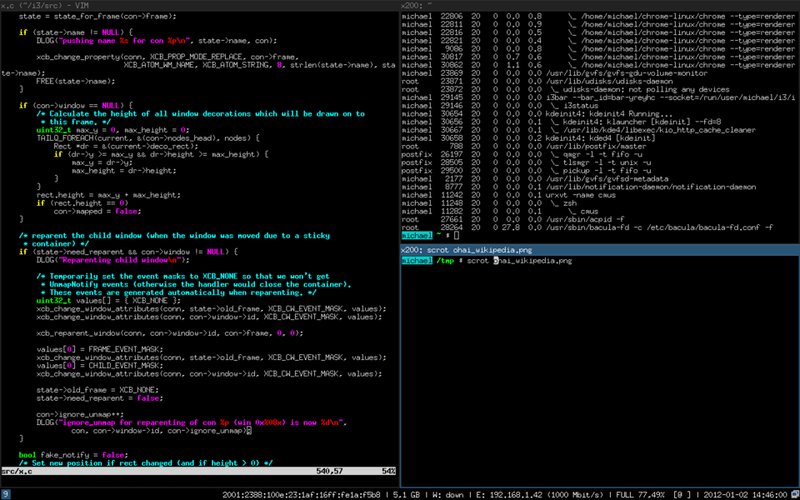
Image: a tiling window layout in the i3 window manager, shown to illustrate the tiling concept; it is not a DreamCoder screenshot. Screenshot by Michael Stapelberg, CC BY-SA 3.0, via Wikimedia Commons. FreeAnswers is not affiliated with DreamCoder.
