
Pi 1.5.0, released November 2, 2026 by Earendil, is an update to the open-source Pi coding agent for the terminal. It shows changelogs for updated extension packages, streams large tool calls faster, lets pi update run a custom update command, and adds OpenAI’s GPT-6.1 Terra with a 500K context window through Codex.
Last updated: November 9, 2026
Table of contents
- What is new in Pi 1.5
- Pi 1.x releases at a glance
- How to install or upgrade to Pi 1.5
- Extension changelogs for package authors
- GPT-6.1 Terra and model changes
- Breaking change: pi-schema tool validation
- How Pi compares with other coding agents
- Frequently asked questions
- Sources
What is new in Pi 1.5
Pi describes itself on pi.dev as a minimal agent harness that you adapt to your workflow with extensions, skills, prompt templates and themes, bundled as Pi packages shared through npm or git. Version 1.5.0 is the sixth feature release since Pi 1.0 shipped on October 1, 2026. According to the v1.5.0 release notes, these are the changes that matter most for daily use:
- Extension update changelogs. After an installed extension package updates, Pi shows what changed on the next fresh launch, under “Extension Updates”.
- Faster streaming. Large tool calls are parsed incrementally, and code-heavy answers reuse syntax highlighting and rendered Markdown instead of redoing that work on every update.
- Custom self-update commands.
pi updatecan run your own update command, for wrappers such as mise or other package managers. - GPT-6.1 Terra. Added for OpenAI, Azure OpenAI Responses and OpenAI Codex.
- Safer tool output.
pi.exec()accepts amaxBufferoption and returnstruncated: truewhen output exceeds it. - MCP OAuth changes. Sign-in now uses Pi’s Client ID Metadata Document by default when the server supports it, and falls back to dynamic client registration. The new
oauth.clientRegistrationsetting acceptsautoordcr.
The release also includes security fixes. A saved “Do not trust” decision for a project is now honored even when the folder only contains an AGENTS.md file, MCP sign-in rejects OAuth URLs that are not http or https, and glob matching was hardened against denial-of-service patterns.
Pi 1.x releases at a glance
Pi has shipped quickly since 1.0. The headline feature of each minor release, taken from the project’s GitHub releases page, is below.
| Version | Release date | Headline change |
|---|---|---|
| 1.0.0 | October 1, 2026 | Fullscreen terminal UI by default (set tuiMode to regular to keep scrollback) |
| 1.1.0 | October 7, 2026 | Program status reporting to terminals and dashboards through OSC 7501 |
| 1.2.0 | October 12, 2026 | OpenRouter model lists limited to what your key may use, with its prices |
| 1.3.0 | October 15, 2026 | Choice of /share destination: auto, gist or radius |
| 1.4.0 | October 21, 2026 | Image input for classifier models in codemode |
| 1.5.0 | November 2, 2026 | Extension changelogs, faster streaming, custom update command, GPT-6.1 Terra |
How to install or upgrade to Pi 1.5
The Pi quickstart lists several install paths. The pi.dev installers pin every dependency; the npm package does not pin transitive dependencies.
- On macOS or Linux, run
curl -fsSL https://pi.dev/install.sh | sh. On Windows, runpowershell -c "irm https://pi.dev/install.ps1 | iex". - Alternatively, with Node.js 22.19 or newer, run
npm install -g --ignore-scripts @earendil-works/pi-coding-agent. - If Pi is already installed through the installer, run
pi update. Nix users runnix profile upgrade piinstead. - Confirm the version with
pi --version, then start Pi in your project folder withpi. - Run
/loginto choose a provider and store a subscription sign-in or API key, then/modelto pick a model.
If a tool such as mise manages your install, set the new update command described in the CLI documentation, for example export PI_SELF_UPDATE_COMMAND="mise use -g npm:{packageName}@{version}". Pi fills in {packageName}, {version} and {installSpec} and runs the command only when pi.dev reports a newer release. For arguments that contain spaces, use the selfUpdateCommand setting in ~/.pi/agent/settings.json as an argument array. The environment variable takes precedence over the setting.
Extension changelogs for package authors
The Pi packages documentation explains how the new changelog display works. By default Pi reads CHANGELOG.md from the package root. You can point pi.changelogPath in package.json at another file, or set it to an empty string to turn the feature off.
- Use version headings in Pi’s format, such as
## [1.2.0]or## 1.2.0 - 2026-01-01. - Only packages that load at least one extension show a changelog; skill-only or theme-only packages do not.
- Users who want less noise can set
collapseChangelogto true for one line per package.
GPT-6.1 Terra and model changes
Pi 1.5.0 adds GPT-6.1 Terra with tool search, thinking-level changes in the middle of a conversation, and support for thinking set to off. The release notes state that the OpenAI Codex provider offers a 500K context window for it. Two related changes affect existing setups:
- The default OpenAI model changed from
gpt-5.5togpt-6.1-sol, including after a ChatGPT sign-in when no model is selected. Pin your choice withCtrl+Sin/modelif you prefer another default. - The built-in catalog moved to models.dev v2, so realtime and image-only models no longer appear as chat models.
You can still switch models mid-session with /model or Ctrl+L and cycle favorites with Ctrl+P, as described on pi.dev. If you run local models, our Ollama 0.40.15 guide covers a common local backend.
Breaking change: pi-schema tool validation
Tool argument validation now runs on @earendil-works/pi-schema. TypeBox features outside JSON Schema, including Type.Refine(), Type.BigInt(), Type.Undefined(), codecs and Format.Set() formats, no longer apply to tool arguments. Extension authors who relied on them should move those checks into the tool’s own code.
The upside is consistency. Plain JSON Schema tools, including MCP tools, now get the same coercion as TypeBox tools, such as turning numeric strings into numbers and wrapping a single value into an array.
How Pi compares with other coding agents
Pi takes a deliberately small approach. Its site says it ships with strong defaults but skips features such as sub-agents and plan mode, and expects you to add them through extensions or have Pi build them. It runs in four modes: interactive, print or JSON, RPC, and SDK. That contrasts with feature-rich tools such as Claude Code 2.1.318 and Codex CLI 0.167. If you are weighing open-source options, compare it with OpenCode 2.2 and Hermes Agent 0.23.
One limitation to plan for: Pi does not ask before every tool call, so the quickstart recommends version control, backups, and a container or other sandbox for untrusted or unattended work.
Frequently asked questions
What is new in Pi 1.5?
Pi 1.5.0 adds changelogs for updated extension packages, faster rendering of large streamed tool calls, a custom command for pi update, and GPT-6.1 Terra through OpenAI, Azure OpenAI Responses and OpenAI Codex. It also moves tool argument validation to pi-schema and changes the default OpenAI model to gpt-6.1-sol.
How do I update the Pi coding agent to 1.5?
If you used the pi.dev installer, run pi update. For an npm install, run npm install -g –ignore-scripts @earendil-works/pi-coding-agent, which needs Node.js 22.19 or newer. Nix users run nix profile upgrade pi, because pi update cannot update a Nix installation.
Does Pi support GPT-6.1 Terra?
Yes. Version 1.5.0 adds GPT-6.1 Terra for the OpenAI, Azure OpenAI Responses and OpenAI Codex providers, with tool search, thinking-level changes mid-conversation and thinking off. The release notes say Codex offers a 500K context window.
Will my Pi extensions break in version 1.5?
Only if their tools rely on TypeBox features outside JSON Schema, such as Type.Refine(), Type.BigInt(), Type.Undefined(), codecs or Format.Set() formats. Those no longer apply to tool arguments. Plain JSON Schema tools, including MCP tools, keep working and now get the same type coercion as TypeBox tools.
Is the Pi coding agent free?
Pi itself is open source under the MIT License. You still need access to a model through a provider, which can be a subscription, an API key or a local model, so any model charges come from that provider.
Sources
- Pi v1.5.0 release notes on GitHub
- Pi official site (pi.dev)
- Pi documentation: Quickstart
- Pi documentation: CLI and custom update command
- Pi documentation: Pi packages and changelogs
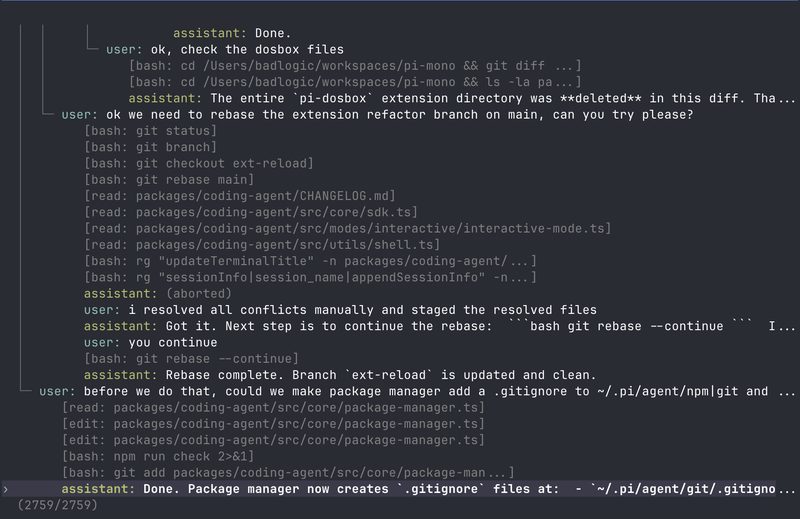
Image: Pi session tree view, from the official Pi press kit by Earendil Inc. and contributors. FreeAnswers is not affiliated with Earendil.