
Last updated: November 18, 2026
Gemini Tasks is the agent mode in the Gemini app that works on multi-step jobs in the background. Since November 17, 2026, it is free in the US, Canada, Australia, India, Japan and South Korea and runs on Gemini 4 Hydrogen. US users also get phone calls, Google Pay checkout, texting and email hand-offs.
Contents
- What changed on November 17
- Who gets it and what it costs
- How to start your first task
- Text, email and phone calls
- Shopping with Google Pay
- Limits, safety and data controls
- Tasks vs. Spark and other agents
- Frequently asked questions
What changed on November 17
Google’s Gemini release notes for November 17, 2026 say tasks in Gemini are rolling out free of charge to hundreds of millions of users. Tasks handle multi-step projects and recurring routines in the background, such as a daily briefing or a trip itinerary, and notify you when results are ready.
In the announcement post, Josh Woodward, who leads the Gemini app, describes Gemini calling two dealerships at once to book a service slot and analyzing utility bills. Google also added four US features: checkout with Google Pay, texting Gemini, emailing tasks to gemini@google.com, and calls to US businesses.
The Verge reports that Tasks is a rebrand of Gemini Spark, the agent Google introduced in May for paid subscribers. For the earlier October changes to the Gemini app, including skills, see our Gemini app new features guide.
Who gets it and what it costs
According to Google’s tasks help article, you must be 18 or older, sign in with a personal Google Account and have Gemini History on. Tasks run in the Gemini mobile app, the Gemini app on Mac and the web app at gemini.google.com.
| Feature | Where it is available | Cost |
|---|---|---|
| Tasks (task mode) | US, Canada, Australia, India, Japan, South Korea | Free; no Google AI subscription needed |
| Tasks (task mode) | Other supported countries, except the EEA, UK, Switzerland and Nigeria | Requires Google AI Pro or Ultra |
| Checkout with Google Pay | US, English, web, Android and iOS, 18+, personal accounts | Included; you pay only for purchases |
| Text with Gemini | US, English, verified US phone number on an eligible carrier | Included |
| Email to gemini@google.com | US, English, 18+, personal accounts | Included |
| Calls to businesses | US, except Indiana, Louisiana, Minnesota, Montana and Nebraska | Included |
Free does not mean unlimited. The help article says usage limits are compute-based and rise with higher Google AI plans; Google publishes no fixed daily task count.
The model is Gemini 4 Hydrogen, built for fast agentic workflows. For its API pricing, read our Gemini 4 Hydrogen guide.
How to start your first task
These steps follow Google’s help article:
- Open gemini.google.com or the Gemini app.
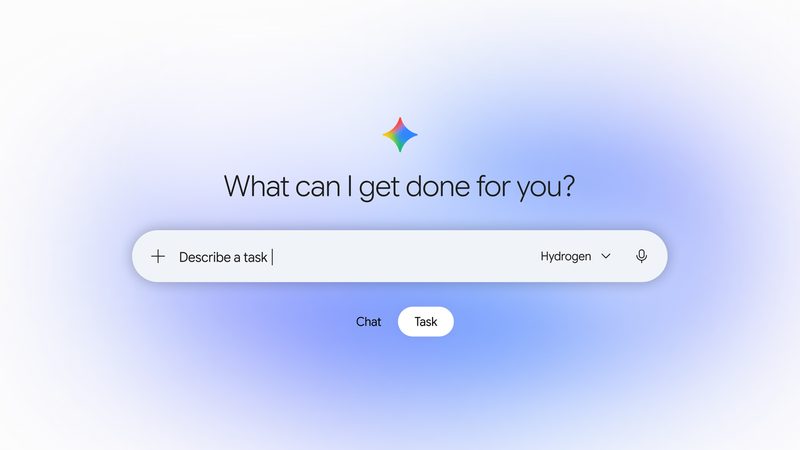
- Below the text box, select Task instead of Chat.
- Describe the goal and, if needed, when to run it, such as a set time or after an event.
- Type
@to attach an existing skill, or use Upload & tools to add files, Drive items or a Notebook. - Select Submit, then watch progress in the task thread’s work panel, which lists completed, current and planned steps.
- Add instructions in the text box at any time. Gemini keeps its progress.
New users can type “set up”, “get started” or “interview me” in a task to configure skills and tasks conversationally. Gemini can return PDF, DOCX, XLSX and PPTX files and create Google Docs, Sheets and Slides.
Text, email and phone calls
The release notes describe three new ways to hand off work in the US:
- Text. Message Gemini from Google Messages or iMessage after a one-time phone verification at gemini.google.com/text. Reply mid-run to steer a task.
- Email. Forward threads or PDFs to gemini@google.com from Gmail, Apple Mail or Outlook. Gemini replies privately to you, never Reply-All, with a link to review and confirm results.
- Calls. Gemini can call several businesses at once, schedule calls during business hours or place recurring calls. You approve the call plan first, then get a summary and full transcript in chat.
To set up texting, the announcement lists these steps: open Gemini on Android or iOS, tap Settings, tap Channels, tap Set up under Text with Gemini, and verify your phone number. On calls, Gemini identifies itself as an AI and does not share payment details.
Shopping with Google Pay
For purchases, you set the item and a maximum price when you start a task. When Gemini finds the item within budget, it stages checkout and sends an itemized summary. After your one-tap and device approval, it completes checkout with a single-use Google Pay virtual card, so the merchant never sees your card number.
The blog post says checkout uses the Agent Payments Protocol (AP2) with Mastercard and Visa, with American Express coming soon. Receipts and tracking land in Google Wallet, and you keep your card’s points and purchase protections. For OpenAI’s comparable feature, see our ChatGPT Wallet guide.
Limits, safety and data controls
- 15 tasks at once. The help article caps running tasks at 15. A schedule will not run while 15 are already active.
- Confirmation for sensitive steps. Gemini always asks before sending communications, deleting data, sharing sensitive info, making purchases, completing financial transactions or submitting web forms. Routine actions can be set to “Always allow.”
- Isolated execution. Google says each task runs in a hardware-isolated virtual machine on Google Cloud’s Agent Compute Engine, dedicated to your account.
- Browser choice. Gemini can use your local Chrome on desktop or a remote browser that keeps working after you close the device. You can take over either one.
- Prompt injection risk. Google warns that hidden instructions in websites, emails or documents can mislead the agent; do not type passwords or payment details into the task thread.
Turning off task mode in Task settings deletes remote browser and remote code execution data and pauses schedules, but keeps your tasks, threads and files.
Tasks vs. Spark and other agents
The release notes show Gemini Spark launching on May 19, 2026 for trusted testers and as a beta for Google AI Ultra subscribers in the US. The November release moves the same agent idea into a Chat/Task toggle, makes it free in six countries and adds calls, payments, texting and email. Start with low-risk research or calendar tasks before handing off purchases.
If you are comparing agents, read our guides to Perplexity Teammates and Alice AI Do it!, which also run tasks on your behalf.
Frequently asked questions
Is Gemini Tasks free?
Yes, in six countries. Since November 17, 2026, tasks in Gemini are available without a Google AI subscription in the US, Canada, Australia, India, Japan and South Korea. Elsewhere you need Google AI Pro or Ultra, and tasks are not offered in the EEA, the UK, Switzerland or Nigeria.
How do I turn on task mode in Gemini?
Open the Gemini app or gemini.google.com and switch the toggle below the text box from Chat to Task. Then describe what you want done. Typing “set up”, “get started” or “interview me” starts a guided setup.
What model runs Gemini Tasks?
Google says the free rollout runs on Gemini 4 Hydrogen, the model it introduced on November 12, 2026 for fast agentic work. You can change the model or thinking level from the model menu at the top of a task.
How many Gemini tasks can run at once?
Up to 15 tasks can run at the same time. A new request or a scheduled run has to wait until one finishes. Usage also counts against Gemini’s compute-based limits, which rise with higher Google AI plans.
Can Gemini buy things without asking?
No. Google says Gemini stages the checkout and sends an itemized summary, and nothing is purchased until you give explicit one-tap and device approval. Purchases, sending messages and submitting forms always require your confirmation.
Sources
- Google: Put Gemini to work for you (November 17, 2026)
- Gemini Apps release notes (2026.11.17)
- Gemini Apps Help: Manage your tasks and workflows
- Google: Introducing Gemini 4 Hydrogen
- The Verge: Google’s Spark AI agent becomes Tasks, and now it’s free
Image: Google’s announcement image for Tasks in Gemini, used for editorial purposes. Courtesy of Google.