
Last updated: November 27, 2026
GigaChat 3.5 Omni, released by Sber on Hugging Face on November 27, 2026, is an MIT-licensed 432B Mixture-of-Experts model with 28B active parameters. It takes any mix of text, images, audio and video with its soundtrack, answers in text, and runs on SGLang across eight H100 GPUs with a 131K-token context.
Contents
- What GigaChat 3.5 Omni is
- Release at a glance
- How the model handles each input
- How to run it with SGLang
- Request patterns for each modality
- Benchmarks and comparisons
- Limitations and gotchas
- Frequently asked questions
What GigaChat 3.5 Omni is
GigaChat 3.5 Omni is the multimodal version of GigaChat 3.5 Ultra, the flagship instant model in Sber’s GigaChat family (GigaChat 3.5 Omni model card) (GigaChat 3.5 Ultra model card). The repository’s release commit is dated November 27, 2026, and the files carry an MIT License.
For power users, the headline is a single open-weight model that can watch a video and hear its soundtrack in time order, transcribe and reason over hours of audio, read documents and screenshots, and call tools, all through an OpenAI-compatible endpoint.
Omni is a separate line from Sber’s GigaChat 4 models; for those, see our GigaChat 4 guide to the 708B and 37B models.
Release at a glance
| Item | Detail |
|---|---|
| Developer | Sber (Hugging Face organization ai-sage) |
| Release | Repository release commit dated November 27, 2026 |
| Size | 432B total parameters, 28B active (Mixture-of-Experts) |
| Inputs | Text, images, audio, video with soundtrack; output is text |
| Context | 131,072 tokens (prompt plus answer) |
| Checkpoint | FP8 with 128 × 128 block quantization; vision and audio encoders kept in BF16 |
| Serving | SGLang, via pull request #51276 |
| Tested hardware | 8 × NVIDIA H100 80GB, one node, tensor parallel 8 |
| License | MIT |
All rows come from the Omni model card and repository (model card). Sber does not list hosted API pricing for Omni on the card.
How the model handles each input
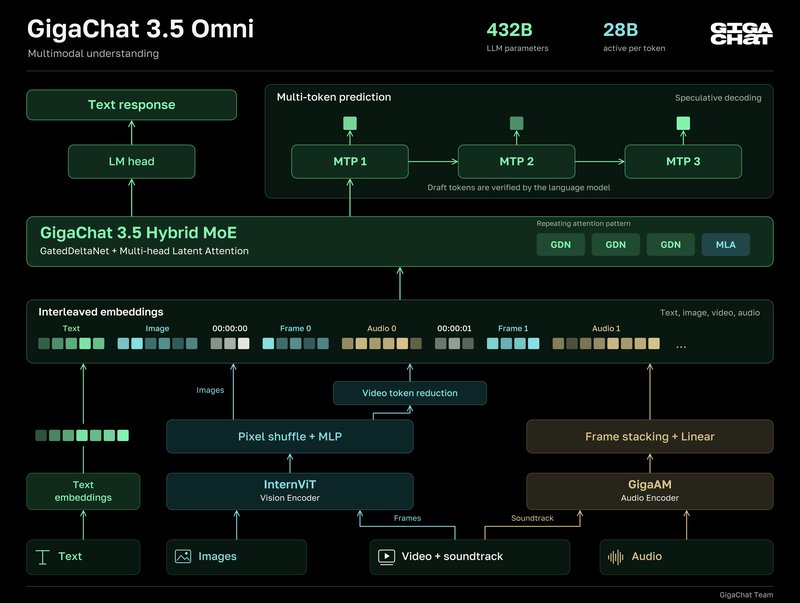
The language model uses the GigaChat 3.5 hybrid design: Multi-head Latent Attention combined with GatedDeltaNet linear-attention layers, GatedNorm, and three multi-token prediction (MTP) heads for speculative decoding (model card). Sber says the hybrid layers lower the cost of long context compared with standard attention (Ultra card).
Two encoders feed that language model:
- Images and video frames: a 300M-parameter InternViT encoder at 448 × 448. An image becomes a thumbnail plus up to six tiles, at 256 tokens each. The first video frame keeps 256 tokens and later frames average 77.
- Audio: a GigaAM encoder on 16 kHz log-mel features, producing 6.25 tokens per second of audio. GigaAM is an MIT-licensed family of open-source acoustic models for speech processing from Salute Developers, which added GigaAM-v4 in November 2026 (GigaAM on GitHub).
- Video with soundtrack: frames are sampled at 1 fps, up to 512 frames. Each frame carries its timestamp and is followed by its share of the soundtrack.
That interleaving is why the model can locate events in time. On Sber’s temporal localization test for clips up to 10 minutes, Omni scores 48.54 mIoU against 0.85 for Qwen3-Omni-30B-A3B (model card).
How to run it with SGLang
- Provision one node with eight 80GB H100 GPUs, the configuration Sber tested.
- Clone SGLang, fetch pull request 51276 into a local branch (
git fetch origin pull/51276/head:pr-51276) and check it out. - Install it with
SGLANG_BUILD_RUST_EXTS=none pip install -e "python[all]". The flag skips optional Rust extensions the server does not need. - Launch
python -m sglang.launch_serverwith--model-path ai-sage/GigaChat3.5-Omni-432B-A28B,--trust-remote-code,--tp 8and--context-length 131072. - Add
--media-url-max-file-size-mb 0to lift SGLang’s 64 MiB media limit for long videos, and--tool-call-parser gigachat35for function calling. - Enable the MTP heads with
--speculative-algorithm EAGLE,--speculative-num-steps 3,--speculative-eagle-topk 1and--speculative-num-draft-tokens 4. - Send a test request to
http://localhost:8000/v1/chat/completions. Do not pass--reasoning-parser.
Every flag above is taken from the model card’s SGLang section (model card). As of this update, the SGLang pull request that adds Omni’s image, video and audio support is still open rather than merged into a release (SGLang PR #51276).
MTP matters for speed. On the tested node, single-request decoding rose from 73.35 to 152.61 tokens per second (2.08×), and 16 concurrent requests rose from 620.68 to 960.09 tokens per second (1.55×) (model card). For a comparable serving stack, our vLLM 0.34 guide to the extensible KV cache covers the main alternative to SGLang.
Request patterns for each modality
The server accepts standard OpenAI chat messages, with these content parts (model card):
| Input | Content part | Notes |
|---|---|---|
| Text | Plain string content | Greedy decoding by default |
| Image | image_url |
Thumbnail plus up to six tiles |
| Video | video_url |
Add use_audio_in_video: true to include the soundtrack |
| Audio | audio_url or input_audio |
input_audio takes base64 data and a format such as wav |
| Tools | tools with tool_choice |
Calls to functions not in the request are dropped |
Three practical patterns follow from the card:
- Keep sampling greedy.
generation_config.jsonsets temperature 0.0, and Sber recommends greedy decoding, which its evaluations used. - Always set the soundtrack flag for video questions about speech. Without
use_audio_in_video, the model sees frames only. With the OpenAI Python client, pass it inextra_body. - Describe every tool. The card asks for a
descriptionon each function.
If you mainly need transcription, compare with our answer on whether DeepSeek can transcribe audio.
Benchmarks and comparisons
Sber compares Omni with Qwen3-Omni-30B-A3B, MiMo-V2.6-Pro and other models using its own evaluation settings (model card). Selected results:
| Benchmark | GigaChat 3.5 Omni | Qwen3-Omni-30B-A3B | Best listed |
|---|---|---|---|
| Video-MME (with soundtrack) | 80.74 | 76.11 | 82.30 (WeMM-Video FP8) |
| Daily-Omni | 81.04 | 72.01 | 81.79 (WeMM-Video FP8) |
| MMAU-Pro (audio) | 65.85 | 62.49 | 65.85 (Omni) |
| RuBQ spoken (Russian) | 78.45 | 42.66 | 78.45 (Omni) |
| OCRBench v2 | 65.59 | 60.16 | 65.59 (Omni) |
| MathVision test | 63.49 | 50.43 | 76.58 (Qwen3.5-397B-A17B) |
Against its text sibling, Omni gives up little on text tasks. It beats GigaChat 3.5 Instruct on SWE-bench Verified (43.80 versus 42.60) and LiveCodeBench v6 (61.80 versus 56.20), but trails on MMLU-Pro (73.07 versus 75.68) and IFBench (40.67 versus 43.66) (model card).
The card’s ablation also shows why combined input matters: on Video-MME, frames plus audio score 80.74, versus 73.07 for frames only and 68.52 for audio only. For a hosted, real-time voice alternative, see our Qwen-Audio-3.1-Live guide to full-duplex voice; for hosted video generation, see our Gemini Omni 1.2 Flash guide.
Limitations and gotchas
- Text output only. Omni understands audio and video but responds in text; it does not generate speech.
- Datacenter hardware. The only tested setup is eight 80GB H100 GPUs, and the card provides an FP8 checkpoint for SGLang rather than a small local build.
- Unmerged serving support. You must build SGLang from the pull request branch until support lands in a release.
- No reasoning section. The model answers directly; a reasoning parser would move the whole answer into
reasoning_content. - Self-reported scores. All benchmarks are Sber’s own runs with stated settings, so test on your own data.
Frequently asked questions
What is GigaChat 3.5 Omni?
GigaChat 3.5 Omni is Sber’s multimodal version of GigaChat 3.5 Ultra. It is a 432B-parameter Mixture-of-Experts model with 28B active parameters that accepts text, images, audio and video with its soundtrack, and answers in text.
Is GigaChat 3.5 Omni open source?
The Hugging Face repository is published under the MIT License, and the weights are downloadable as an FP8 checkpoint for inference with SGLang.
What hardware does GigaChat 3.5 Omni need?
The model card lists one node with 8 NVIDIA H100 80GB GPUs using tensor parallelism of 8 as the tested setup.
How long a video or audio file can it process?
The context is 131,072 tokens. Sber tested video with soundtrack up to 3 hours and audio up to 5 hours, and estimates the context fits about 3.9 hours of video or 5.7 hours of audio.
Does GigaChat 3.5 Omni support function calling?
Yes. Launch SGLang with –tool-call-parser gigachat35 so calls come back as OpenAI-style tool_calls, and give every function a description.
Sources
- Hugging Face: GigaChat 3.5 Omni model card (ai-sage)
- Hugging Face: GigaChat 3.5 Ultra model card (ai-sage)
- GitHub: SGLang pull request #51276, GigaChat3.5-Omni support
- GitHub: GigaAM speech models (Salute Developers)
Featured image: GigaChat 3.5 Omni architecture diagram by the GigaChat Team, from the MIT-licensed Hugging Face repository, resized. FreeAnswers is not affiliated with Sber.
Related guide: Kandinsky 6.5 guide: video, image and API access.