
Last updated: November 11, 2026
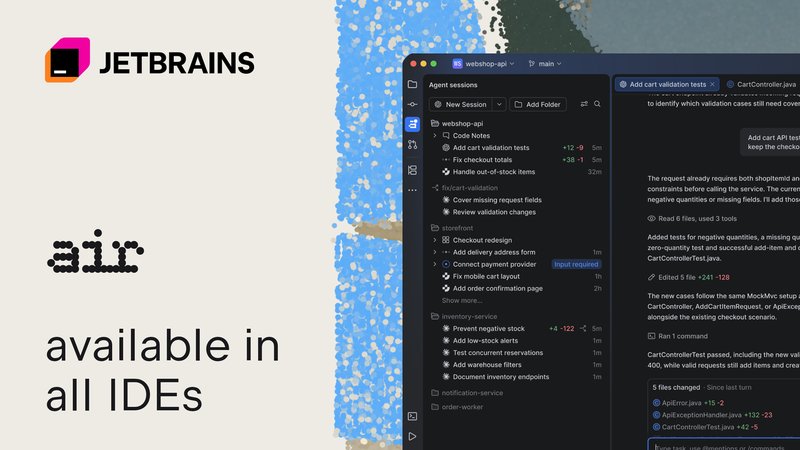
JetBrains Air is now built into JetBrains IDEs from version 2026.3. It lets you run Junie, Claude Code, Codex, GitHub Copilot and other agents inside the IDE, follow parallel sessions and review their changes with IDE tools. Local use needs no JetBrains AI subscription, and Junie Lite is free for a limited time.
Contents
- What changed with Air in 2026.3
- Agents, accounts and what costs money
- How to start using Air
- How to review agent work with Code Notes
- Air compared with AI Assistant
- Workflows for power users
- Limitations
- Frequently asked questions
This guide is based on JetBrains’ Air in JetBrains IDEs announcement of November 11, 2026, the official Air in IDEs product page and the What’s New in IntelliJ IDEA 2026.3 post.
What changed with Air in 2026.3
Air first appeared in an Early Access Program in October 2026, as a Marketplace plugin and in 2026.3 EAP builds. With the 2026.3 release, JetBrains ships it inside its IDEs. The IntelliJ IDEA 2026.3 post lists Air first among the release highlights and calls it “a new layer for agentic development.”
According to the announcement, Air runs inside the IDE, so agents can use the IDE’s MCP server and built-in skills. They can check inspections, run builds and run configurations, query databases and use IDE refactorings. In IntelliJ IDEA and CLion, they can also drive the debugger.
| Feature | What it does |
|---|---|
| Parallel sessions | Follow agents across projects, see which need input, and get notifications |
| Git worktrees | Give each agent its own local worktree so parallel sessions do not collide |
| Presets | Save an agent, model and instructions for a task type and reuse them |
| Review panel and Code Notes | See what a session changed and send line comments back with code context |
| Usage view | Shows session cost in tokens or money and your remaining JetBrains AI quota |
| Commit messages | Drafts a commit message from the changes you select |
Agents, accounts and what costs money
JetBrains says Air supports Codex, Claude Agent in chat, Claude Code in the terminal, Gemini, GitHub Copilot, DeepSeek, OpenCode, Cursor, Pi, Grok, Kimi, Kilo and more through the Agent Client Protocol (ACP). You can add agents from the ACP registry or connect compatible tools already installed on your machine.
A session can use the agent’s own login, an API key, or JetBrains AI. The product page notes that each provider keeps its own pricing, usage limits and sign-in rules, and balances are not pooled between subscriptions.
| Use case | What you need |
|---|---|
| Local sessions with your own agent | Your provider subscription or API key; no JetBrains AI plan |
| Junie Lite | A JetBrains Account; free for a limited time |
| Claude Code with Pro or Max | Claude Code run in Air’s terminal, where you sign in |
| Claude Agent in chat view | JetBrains AI subscription or Anthropic API key |
| Cloud runs and Air Teams | JetBrains AI subscription |
Code completion keeps working and does not count against JetBrains AI quota. Next edit suggestions need a JetBrains AI subscription or GitHub sign-in. If you plan to use Copilot, see our GitHub Copilot in JetBrains Air guide.
How to start using Air
The product page and announcement give these steps:
- Update to a 2026.3 JetBrains IDE, such as IntelliJ IDEA, PyCharm, WebStorm, Rider, CLion, RustRover, GoLand, PhpStorm or RubyMine.
- Open Air with the Agent Sessions icon, or press Cmd+2 on macOS or Alt+2 on Windows and Linux.
- To try it at no cost, sign in with your JetBrains Account, select Junie as the agent and Lite as the model.
- To use another agent, open Manage Agents and add one from the ACP registry or from your machine, then connect its account.
- Give the agent a task. For parallel work, assign it a separate Git worktree.
- For a layout like AI Assistant, open Settings in Air’s lower left corner, hover over Show Chat and select In Toolwindow.
Air does not start agents or send code to a provider automatically. You choose and authorize an agent first. With remote development, Air and the agents run on the remote backend.
How to review agent work with Code Notes
When an agent finishes, open the review panel to see what changed. Then use the IDE as usual: navigate code, run inspections and tests, or start the debugger. Leave Code Notes on specific lines to ask for changes, and send them back to the session with the code attached. Code Notes also work with terminal agents such as Claude Code.
Air compared with AI Assistant
AI Assistant stays available as a separate plugin until early 2027. AI Chat now lives in Air as agent sessions, and old chats are converted to Junie sessions. For quick questions, JetBrains suggests Junie with the Lite or Luna model and Effort set to Off. Installing Air from the AI Assistant notice disables AI Assistant, but you can turn it back on.
For more on Junie’s cheaper modes, read our Junie Eco Mode and Junie Lite guide.
Workflows for power users
- Agent comparison. Run two agents on the same task in separate worktrees and compare the diffs in the review panel.
- Task presets. Keep one preset for test writing and another for refactoring, each with its own agent, model and instructions.
- Debugger-assisted fixes. In IntelliJ IDEA or CLion, let a supported agent use the debugger, then confirm the fix yourself.
- Local to cloud. With a JetBrains AI subscription, hand long tasks to cloud agents and follow them on the web; Air Teams on mobile is listed for November 15.
Related reading: Is Claude Code free?, our Antigravity CLI 1.5 guide on ACP and our Cursor Projects multiplayer guide.
Limitations
- Worktrees that agents create on their own are not yet tracked in Air.
- The cost view covers JetBrains AI; the same view for Codex, Claude and Copilot is still in progress.
- Features differ by agent, including sign-in, IDE tools and model choice.
- Git worktrees separate working copies but are not security sandboxes.
- In 2026.3, Air is bundled, so it can be disabled in Settings | Plugins but not uninstalled there.
Frequently asked questions
What is JetBrains Air in IDEs?
Air is a workspace inside JetBrains IDEs where you run coding agents, track their sessions and review their changes. It shipped as part of the 2026.3 IDE release, announced on November 11, 2026. Agents can use IDE tools such as inspections, run configurations, databases and refactorings.
Do I need a JetBrains AI subscription to use Air?
No, not for local agent work. You can use a supported provider account, an API key, or a JetBrains Account with Junie Lite, which is free for a limited time. A JetBrains AI subscription is currently required for cloud runs. Provider charges, limits and fair-use terms still apply.
Can I use my Claude Pro or Max subscription in Air?
Yes, through Claude Code in Air’s terminal. Open Manage Agents, choose Terminal instead of Chat for Claude, start a session and sign in. Claude Agent in the chat view needs a JetBrains AI subscription or an Anthropic API key.
Which agents does Air support?
JetBrains lists Codex, Claude Agent, Claude Code, Gemini, GitHub Copilot, DeepSeek, OpenCode, Cursor, Pi, Grok, Kimi, Kilo and Junie, plus others through the Agent Client Protocol (ACP). Features such as sign-in, IDE tools and model choice vary by agent.
What happens to AI Assistant?
AI Assistant stays available and supported as a separate plugin until early 2027. AI Chat has moved into Air as agent sessions, and earlier AI Chat conversations are converted to Junie sessions automatically. You can reopen AI Assistant by pressing Shift twice and searching for Open AI Assistant.
Sources
- JetBrains IDEs Transformed for the Agentic Era of Development, With Air (JetBrains AI Blog, November 11, 2026)
- JetBrains Air in JetBrains IDEs, official product page
- What’s New in IntelliJ IDEA 2026.3 (IntelliJ IDEA Blog)
- A New Agentic Experience: JetBrains Air in IDEs, EAP Now Open (JetBrains AI Blog, October 2026)