
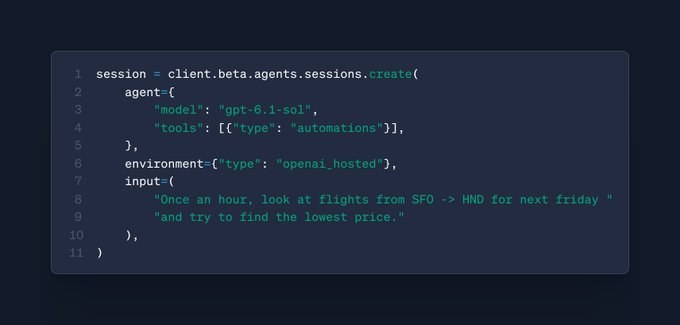
OpenAI’s Agents API, a public beta that runs the Codex harness as a managed service, added three major features in late October 2026: automatic review of risky actions (October 30), in-session tool updates with background compaction (October 30), and scheduled automations that run agent work on a cron schedule (October 23).
Last updated: November 9, 2026
Table of contents
- What is new in the Agents API
- Before and after the October updates
- How automatic review works
- How to schedule an automation
- Pricing and sandbox sizes
- Limitations to plan for
- Frequently asked questions
- Sources
What is new in the Agents API
OpenAI released the Agents API in public beta on September 10, 2026. The OpenAI API changelog lists these changes since mid-October, newest first:
- Automatic review (October 30). Set a session’s
reviewfield to"auto_review"and a model approves or denies supported tool and permission requests based on conversation intent and risk. - Tool updates in a live session (October 30). You can replace the tool list of an existing session. Function tools and MCP servers change on the next model call; built-in tools change by the next turn.
- Background compaction (October 30). Context compaction now runs in the background by default. Set
compaction.asynctofalsefor blocking compaction. OpenAI notes this may increase token usage. - Time awareness (October 30). An opt-in experimental setting,
experimental.time_awareness, gives the model periodic current-time reminders. It is off by default. - Scheduled automations (October 23). Schedule one-time or recurring tasks in new or existing sessions, and let an agent schedule its own follow-ups with the
automationstool. - Sandbox skills and Ultrafast (October 16). OpenAI-hosted sandboxes now include the Artifact SDK and skills for spreadsheets, presentations and Word documents. Ultrafast mode is set with
agent.service_tieron supported models.
Before and after the October updates
| Area | Earlier beta behavior | After the October updates |
|---|---|---|
| Risky actions | No automatic review option | review: "auto_review" lets an OpenAI-managed reviewer model decide |
| Changing tools | Not listed in the changelog before October 30 | Update tools on an existing session; the new list replaces the old one |
| Compaction | Blocking | Background by default; opt out with compaction.async: false |
| Recurring work | No built-in scheduler listed | Cron or one-time automations stored by the API |
| Document output | Office-document skills not listed before October 16 | Artifact SDK and office-document skills in hosted sandboxes |
If you are comparing hosted agent services, our guides to Mistral Managed Agents and the Perplexity Agent API cover similar ground from other vendors. Within OpenAI’s own stack, the OpenAI agents overview compares the Agents API with the Agents SDK and the Responses API.
How automatic review works
According to OpenAI’s automatic review guide, the feature brings the “Approve for me” behavior of the Codex harness to your own agents. It covers shell commands that need approval, file changes, broader filesystem or network permission requests, and MCP tool calls whose rules require confirmation.
The setting applies to root turns and any subagents they create. It does not override the environment’s outbound network restrictions. Your application still handles browser origin-access and sign-in requests.
Two values are accepted. "auto_review" approves or denies supported requests. "none", the default, applies no review, and most actions run directly within the environment’s permissions. Setting "none" does not route actions to your app for manual approval.
You can change the mode between tasks with a session update. If the main task is still active, the API returns 409 Conflict and applies none of the changes, so build in a retry.
How to schedule an automation
The scheduled automations guide describes a saved schedule that sends a task to a session. Each run creates an invocation record. Follow these steps for a daily task:
- Create and save an agent with the instructions and tools the task needs, then note its ID.
- Choose a target:
new_sessionfor independent work (needs an agent, an environment andtarget.input) orexisting_sessionfor follow-ups that need earlier findings (needs a session ID andtarget.instructions). - Pick the timing:
periodicwith a five-field cronexpressionand an IANAtimezone, such as0 10 * * *inAmerica/New_York, oroncewith a future Unix timestamp in seconds inrun_at. - Create the automation through
/v1/agents/automations. It is saved asactiveand does not run immediately. - Test it right away with
POST /v1/agents/automations/{id}/invocations. A manual run does not change the schedule. - List invocations to check delivery, then follow the session events with the returned
session_idto see the actual result.
A completed invocation only means the session accepted the task, not that the agent finished. Recurring runs also get a small randomized delay, and a busy session makes the task wait. Pause, resume and delete operations are available, but pausing does not stop work a session has already accepted.
For ongoing goals, OpenAI suggests enabling multi-agent orchestration and asking the main agent to delegate each scheduled check to a subagent. This keeps repeated tool output out of the main context window.
Pricing and sandbox sizes
The Agents API has no separate platform fee. Model usage is billed at the selected model’s rates, tools at their standard rates, and automatic review tokens are billed in addition. OpenAI’s hosted sandbox guide lists three container sizes:
| Size | vCPU | Memory | Listed container rate |
|---|---|---|---|
small |
1 | 1 GB | $0.03 per 20-minute session |
medium (default) |
2 | 4 GB | $0.12 per 20-minute session |
large |
4 | 16 GB | $0.48 per 20-minute session |
The rates come from the OpenAI API pricing page, which also says eligible container sessions are billed by the minute with a 5-minute minimum. The October 9 changelog entry added that hosted sandbox compute is billed only during active turns, not idle time. For model rates, see our OpenAI API pricing guide and the GPT-6.1 Terra guide.
Limitations to plan for
- Still a beta. SDK calls use the
beta.agentsnamespace, and cURL requests need theOpenAI-Beta: agents=v1header. - Project access required. If your project lacks automatic review, the API rejects the request and names
reviewas the problem. - Environment rules. Automatic review is not supported when reusing an existing hosted environment through
environment_id, and self-hosted setups need sandbox prerequisites first. - Agent-scoped schedules. The
automationstool cannot start new sessions or touch other sessions’ schedules. - Sandbox expiry. A hosted sandbox can be deleted after an hour without activity or keep-alives, and the timeout is not configurable. Files in
/workspace/outputsare kept as artifacts.
If you work in the terminal, our Codex CLI 0.167 guide covers the local side of the same Codex harness.
Frequently asked questions
What is the OpenAI Agents API?
It is a public beta API that gives your application the Codex harness as a managed service. OpenAI handles sessions, orchestration, context compaction and recovery, while your app supplies tools and chooses whether the agent runs with no environment, in an OpenAI-hosted sandbox or on your own compute.
How much does the OpenAI Agents API cost?
There is no separate Agents API fee. Model usage is billed at the chosen model’s API rates, OpenAI tools at their standard rates, and hosted sandboxes at container rates. Automatic review tokens are billed on top of the agent’s model usage.
How do I turn on automatic review?
Set the session’s review field to “auto_review” when you create the session. It defaults to “none”. Your project must have access to the feature, and it is not supported when you reuse an existing hosted environment through environment_id.
Can an agent schedule its own follow-up tasks?
Yes. Add the automations tool to the agent. It can then create, list, update, pause, resume and delete automations that target its current session, but it cannot start new sessions or manage another session’s schedules.
What is the difference between the Agents API and the Agents SDK?
With the Agents API, OpenAI runs a managed Codex harness and saves session progress, and OpenAI rates the integration effort as low. The Agents SDK runs inside your application and gives you control over deployment, storage, approvals and runtime integration, with medium integration effort.
Sources
- OpenAI API changelog (October and November 2026 entries)
- OpenAI: Automatic review for Agents API sessions
- OpenAI: Scheduled automations
- OpenAI: OpenAI-hosted sandboxes
- OpenAI: API pricing
Image: code example from OpenAI’s scheduled automations announcement on the OpenAI Developer Community, used for editorial purposes. FreeAnswers is not affiliated with OpenAI.