
Last updated: November 22, 2026
Microsoft Edge shopping now includes two Copilot-era tools for the holidays: Edge offers to compare similar products open in separate tabs and shows a Copilot summary of specs and prices, and Checkout Savings looks for a working coupon at checkout. Both are built in on Windows and Mac; Checkout Savings is U.S. English only.
Contents
- What is new in November 2026
- All Edge shopping tools at a glance
- How to compare products with Copilot
- How Checkout Savings works
- Cashback rules power users should know
- Turning shopping features on or off
- Edge vs Chrome, according to Microsoft
- Limitations
- Frequently asked questions
What is new in November 2026
On November 9, 2026, Microsoft’s Sean Lyndersay announced the new Edge shopping tools on the Microsoft Edge Blog, ahead of Black Friday (November 27) and Cyber Monday (November 30). Microsoft describes two additions:
- Product comparison. When Edge recognizes that you are weighing similar products across tabs, it offers to compare them. One click and Copilot generates a summary alongside the page you are on, comparing specifications, prices and other information, and pointing out what makes each product stand out. Microsoft says this is available in all Copilot markets.
- Checkout Savings. When you reach checkout, Edge looks for coupons in the background and can surface one when it is available. Microsoft says it is only available in en-US.
Microsoft also says Edge has helped shoppers save nearly $30 million in total so far this year through its shopping features.
All Edge shopping tools at a glance
| Tool | What it does | Status |
|---|---|---|
| Product comparison | Copilot compares similar products open in different tabs, side by side with the page | New (Nov 9, 2026), all Copilot markets |
| Checkout Savings | Searches for a working coupon at checkout and shows it if one is found | New (Nov 9, 2026), en-US only |
| Price Comparison | Shows when the same item is available for less at another retailer | Existing |
| Price History | Shows how an item’s price has moved over time | Existing |
| Price Tracking | Alerts you when a tracked item’s price drops | Existing |
| Cashback | Offers cashback at eligible retailers if you activate the offer before buying | Existing, eligible accounts in 36 countries |
At participating retailers, Microsoft says a Shopping tag in the address bar opens a side pane with these tools.
How to compare products with Copilot
Microsoft’s own example is choosing between three pairs of headphones.
- Update Edge on Windows or Mac and sign in with your Microsoft account.
- Open each product in its own tab, for example three headphone product pages from different stores.
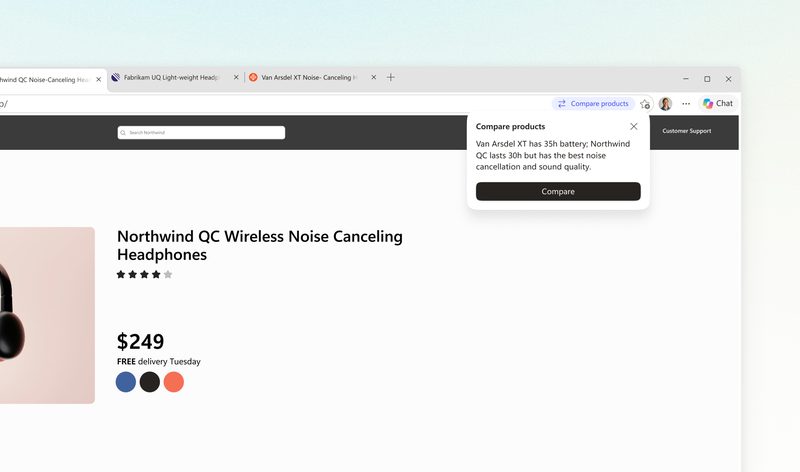
- Watch the address bar. When Edge notices similar products, it offers to compare them. Windows Mode reports that this appears as a “Compare products” prompt.
- Select Compare. Copilot builds the summary next to the current page.
- Ask follow-up questions in Copilot, such as which model has the longer battery life. Microsoft says Copilot already has those tabs as context, so you do not need to explain them again.
- Verify key specs and the final price on the retailer page before you buy.
If the prompt never appears, Windows Mode reports that the comparison depends on Copilot being allowed to read page content, which is a separate Copilot setting. Microsoft says you decide whether Copilot accesses your browsing activity, including tabs and webpage content.
How Checkout Savings works
Add items to your cart and go to the retailer’s checkout page in Edge. Checkout Savings searches for coupons in the background and can show one if it finds an offer. Microsoft stresses that there are no coupon-site detours and nothing to install, but also that shopping experiences “may vary by website,” so it will not find a code for every cart. Its Edge holiday shopping page adds that availability and results are not guaranteed.
A practical tip: check the order total after a coupon is applied, including shipping and sales tax, so you know what the code actually saved.
Cashback rules power users should know
Cashback and coupons can interact. Microsoft’s Cashback FAQ lists these requirements and limits:
- You need a personal (not work or school) Microsoft account, continuous enrollment in Microsoft Rewards, and to be at least 18 and resident in a participating territory.
- Activate the offer during the shopping visit and finish the purchase in a single session without leaving the retailer’s site.
- Using a coupon code can make a purchase ineligible for cashback, and ad blockers or disabled third-party cookies can block activation.
- Earnings are capped at US$200 per calendar month and US$1,000 per year, and rewards usually stay pending for 30 to 90 days before you can transfer them to PayPal.
So when Edge offers both a cashback offer and a coupon on the same order, compare the two amounts before you apply the code.
Turning shopping features on or off
Microsoft says you can turn these shopping experiences on or off at any time in Edge Settings. Windows Mode reports the path as Settings > Privacy, search, and services > Search and connected experiences, then the toggle Save time and money with Shopping in Microsoft Edge.
On managed devices, administrators use the EdgeShoppingAssistantEnabled policy (Edge 87 and later on Windows and macOS). Microsoft Learn says that when the policy is disabled, price comparison, coupons, rebates and express checkout are not automatically found on retail domains. The policy does not apply to a profile signed in with a personal Microsoft account.
Edge vs Chrome, according to Microsoft
Microsoft’s holiday shopping page includes its own comparison with Chrome. These are Microsoft’s marketing claims, not independent tests:
| Capability (Microsoft’s wording, shortened) | Edge | Chrome |
|---|---|---|
| Offers to compare products across open tabs automatically | Yes | No |
| Shows a lower price for the same item at another store | Yes | No |
| Built-in cashback at participating stores | Yes | No |
| Shows valid coupons and cashback offers at checkout | Yes | No |
For other AI shopping assistants this season, see our guides to Walmart Sparky’s holiday features, Alexa for Shopping by text and Gemini Connected Apps for shopping carts. For agent payments, read the ChatGPT Wallet guide, and for Copilot plans, see whether Microsoft Copilot is free.
Limitations
- Checkout Savings is en-US only for now, and results vary by website.
- Desktop only in this announcement. Microsoft lists Edge for Windows and Mac.
- AI summaries can be wrong. Treat the Copilot comparison as a starting point and confirm specs, sizes and prices on the product page.
- Coupons may cost you cashback. Check the Cashback terms before applying a code.
Frequently asked questions
What is new in Microsoft Edge shopping for the 2026 holidays?
Microsoft announced two tools on November 9, 2026: product comparison, where Edge offers to have Copilot compare similar products open in different tabs, and Checkout Savings, which looks for a working coupon when you reach a checkout page.
Is Checkout Savings available outside the United States?
Not yet. Microsoft says Checkout Savings is only available in en-US. Product comparison is available in all Copilot markets, and Microsoft notes that shopping features may vary by website.
Does Edge read all my tabs to compare products?
Microsoft says Edge only offers to help when it notices similar products in your open tabs, and it reviews those pages in full only after you choose to compare. You can turn the feature off in Edge Settings.
Can I use a coupon and Microsoft Cashback on the same order?
Be careful. Microsoft’s Cashback FAQ lists using a coupon code as one reason a purchase may not earn cashback, so compare the coupon discount with the cashback offer before you apply a code.
Do I need an extension for Edge shopping tools?
No. Microsoft says the comparison, Checkout Savings, Price Comparison, Price History, Price Tracking and Cashback tools are built into Edge for Windows and Mac, with nothing to install.
Sources
- Microsoft Edge Blog: Shop faster and save money with built-in tools in Microsoft Edge (November 9, 2026)
- Microsoft: Holiday shopping, done faster in Microsoft Edge
- Microsoft: Microsoft Cashback FAQ
- Microsoft Learn: EdgeShoppingAssistantEnabled policy
- Windows Mode: Edge adds product compare and a coupon finder (November 11, 2026)
Image: Microsoft Edge “Compare products” screenshot, courtesy of Microsoft, from the Microsoft Edge Blog (November 9, 2026); used for editorial purposes and resized. Microsoft, Edge and Copilot are trademarks of Microsoft Corporation; FreeAnswers is not affiliated with Microsoft.
1 thought on “Microsoft Edge Shopping: Power-User Guide to Copilot Compare and Checkout Savings”