
Last updated: November 22, 2026
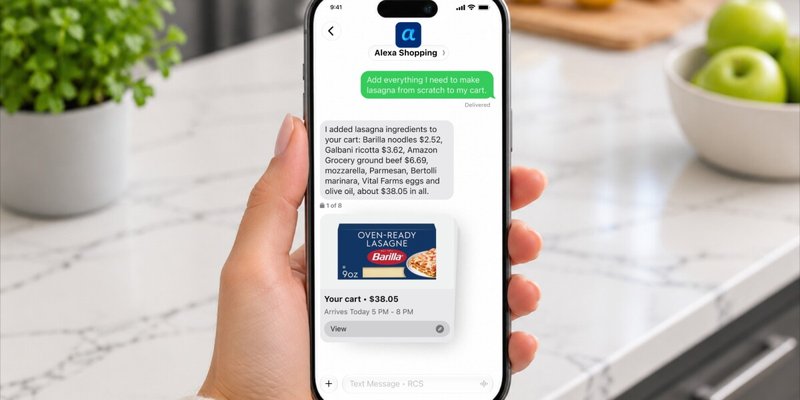
Alexa for Shopping, Amazon’s AI shopping agent, can now be used by text message. Since November 13, 2026, all U.S. Alexa for Shopping customers can sign up to text a contact named Alexa Shopping to search, compare, build carts, buy with approval, track prices and check orders, as long as their phone supports RCS chats.
Contents
- What changed in November
- What you need to text Alexa for Shopping
- How to set up texting
- What you can do by text
- A Black Friday and Thanksgiving workflow
- Text vs app vs the old Rufus
- Prompt patterns that work well
- Limitations and cautions
- Frequently asked questions
What changed in November
Amazon announced texting for Alexa for Shopping on November 6, 2026. An update to the same post on November 13 says the feature is now widely available to all Alexa for Shopping customers. After you sign up, a contact called “Alexa Shopping” appears on your phone, and you text it the way you would text a person.
The text channel uses the same assistant that runs in the Amazon Shopping app and on Amazon.com, and per Amazon’s texting page it can also cancel an order.
Amazon is also rolling out continuity, so a request started by text can continue in the app, on Amazon.com or on an Alexa-enabled device. Amazon says more than 400 million customers have used Alexa for Shopping in the last 12 months.
What you need to text Alexa for Shopping
The requirements come from Amazon’s Shop by text page:
| Requirement | Details |
|---|---|
| Location | All 50 U.S. states and Washington, D.C. |
| Amazon account | A personal account with a verified mobile number set as the primary phone number |
| Phone | RCS (Rich Communication Services) chats turned on; most Android phones using Google Messages and iPhones on iOS 18 or later |
| Carrier | Must support RCS business messaging; Google Fi on iPhone is not currently supported |
| Sign-up | Accept the terms on Amazon’s texting page, then wait for a welcome text |
How to set up texting
- Check RCS. On iPhone, confirm you are on iOS 18 or later with RCS messaging turned on. On Android, use Google Messages with RCS chats enabled.
- Confirm your number. In your Amazon account, make sure your mobile number is verified and set as the primary phone number.
- Open the sign-up page. Go to amazon.com/text-alexa-shopping and sign in, or scan the QR code on that page with your phone.
- Tap Text Alexa. Review and accept the terms.
- Wait for the welcome text. The contact appears on your phone as “Alexa Shopping.”
What you can do by text
Amazon’s announcement lists these example requests.
| Task | Example text | What Alexa for Shopping does |
|---|---|---|
| Several errands at once | “I’m out of dog food, need a birthday gift for my sister, and we’re low on paper towels” | Works on all three and sends suggestions as it finds them |
| Groceries | A photo of a recipe, or “add broccoli to my last order” | Adds ingredients to your cart or edits the order |
| Reorders | “Reorder the laundry detergent I bought last month” | Finds the item and buys it with your approval |
| Deal tracking | “Let me know when AirPods go on sale” | Watches the price and alerts you when it drops |
| Price history | “What’s the price history on this Kindle?” | Shows up to a full year of prices |
| Lists and orders | “Create a new holiday gift list” or “Where’s my package?” | Updates lists or reports delivery status |
Products from other stores can appear through Shop Direct. Per Amazon’s how-to guide, eligible items have a Buy For Me button that completes the purchase on the merchant’s site with your Amazon payment and shipping details.
A Black Friday and Thanksgiving workflow
Amazon’s Black Friday FAQ says its Black Friday Week and Cyber Monday events began at 12:01 a.m. PST on November 19 and run through November 30, 2026. That window covers Thanksgiving on November 26. A practical sequence:
- Build the list. Text “create a new holiday gift list,” then add items as you think of them.
- Check whether a deal is real. Ask for the price history; Amazon says Alexa for Shopping shows 30-, 90- and 365-day views.
- Set a target price. Ask for a price alert, or say “Buy these headphones when they’re 30% off.” With auto-buy, the purchase uses your default payment method, so check that card first.
- Handle the holiday meal. Send a photo of your recipe and ask Alexa to add the ingredients to your cart. Our guide on how to thaw a turkey safely can help you plan the delivery date.
If you are comparing AI subscriptions during the sales, see our answer on whether there is a Gemini Black Friday deal.
Text vs app vs the old Rufus
Rufus launched in February 2024 and, per Amazon, helped over 300 million customers in 2025. On May 13, 2026, Amazon introduced Alexa for Shopping, combining Rufus’s product knowledge with the memory and personal context of Alexa+.
| Feature | Alexa for Shopping in the app or on Amazon.com | Alexa for Shopping by text |
|---|---|---|
| How to start | Tap the Alexa icon in the app’s bottom bar, or find it at the top of the page on desktop | Sign up on Amazon’s texting page and text the Alexa Shopping contact |
| Where | Full availability in 13 countries | 50 U.S. states and Washington, D.C. |
| Price alerts and auto-buy | Yes | Yes, including deal alerts by text |
| Order updates | Ask in chat | In the same thread, with delivery notifications rolling out over time |
Alexa for Shopping is not the only agent that can buy for you this season. For other approaches, see our guides to Gemini Tasks and Google Pay checkout and ChatGPT Wallet purchases with dots. For background on Amazon’s stance toward outside shopping agents, read whether Amazon blocked Meta’s Muse agent.
Prompt patterns that work well
- State standing rules once: “We only drink oat milk” or “My son wears a youth size 12 now.” Amazon says the assistant remembers these.
- Set exact triggers: “Purchase this t-shirt when it’s $15 or less” is clearer than “tell me if it gets cheaper.”
- Automate repeats: ask it to create a Scheduled Action, such as restocking pet food monthly, so items are added to your cart for review.
Limitations and cautions
- U.S. only for texting, and only on phones and carriers that support RCS business messaging.
- Auto-buy spends real money with your default payment method when a target is hit. Review active price targets before a large sale.
- No off switch described: “alexa for shopping turn off” is a top Google autocomplete suggestion, but Amazon’s announcements do not describe a setting to disable the assistant in the app.
Frequently asked questions
Is Alexa for Shopping the same as Rufus?
Yes, in practice. Amazon introduced Alexa for Shopping on May 13, 2026 by combining the product knowledge of Rufus, its earlier shopping assistant, with the personal context of Alexa+.
Where is texting with Alexa for Shopping available?
Texting is available in all 50 U.S. states and Washington, D.C. The assistant itself is available in full in 13 countries, including the U.S., the United Kingdom, Germany, France and Italy.
Can Alexa for Shopping buy something without asking me?
It can if you set it up that way. With auto-buy, you give a target price, such as buying headphones at 30% off, and Alexa for Shopping completes the purchase with your default payment method when the price is reached. For reorders by text, Amazon says it buys with your approval.
Can I turn off Alexa for Shopping?
Amazon’s announcements do not describe a setting that turns the assistant off in the Amazon Shopping app or website. Texting is opt-in: you only get the Alexa Shopping contact after you sign up and accept the terms.
Sources
- About Amazon: Alexa for Shopping is now just a text away (November 6, 2026, updated November 13)
- Amazon: Shop by text with Alexa Shopping
- About Amazon: How to use Alexa for Shopping (updated October 29, 2026)
- About Amazon: When is Amazon’s Black Friday 2026 event?
- About Amazon: Meet Alexa for Shopping (May 13, 2026)
Image: Alexa Shopping text conversation, courtesy of Amazon, from its November 6, 2026 announcement; used for editorial purposes and resized. Alexa is a trademark of Amazon.com, Inc.; FreeAnswers is not affiliated with Amazon.